ESEMPIO PRATICO · PDF SCANSIONATO IN EXCEL
50 pagine di fatture scansionate in un registro contabile fornitori controllato
Un commercialista ha ricevuto un PDF scansionato di 50 pagine di fatture per una riunione del consiglio comunale. Ha chiesto a di trasformarlo in un registro debiti fornitori in Excel, una riga per fattura, con ogni importo letto direttamente dalla fattura scansionata.
ha letto la scansione, ha creato il registro con un totale e un controllo rispetto alla nota di accompagnamento, e i numeri coincidevano al centesimo. Dopodiché, nello stesso file Excel, ha aggiunto una categoria Co.Ge. per ciascuna fattura e un foglio di riepilogo che si riconcilia con il totale.
1Il caricamento: un PDF scansionato di 50 pagine, una nota di accompagnamento e nove fatture
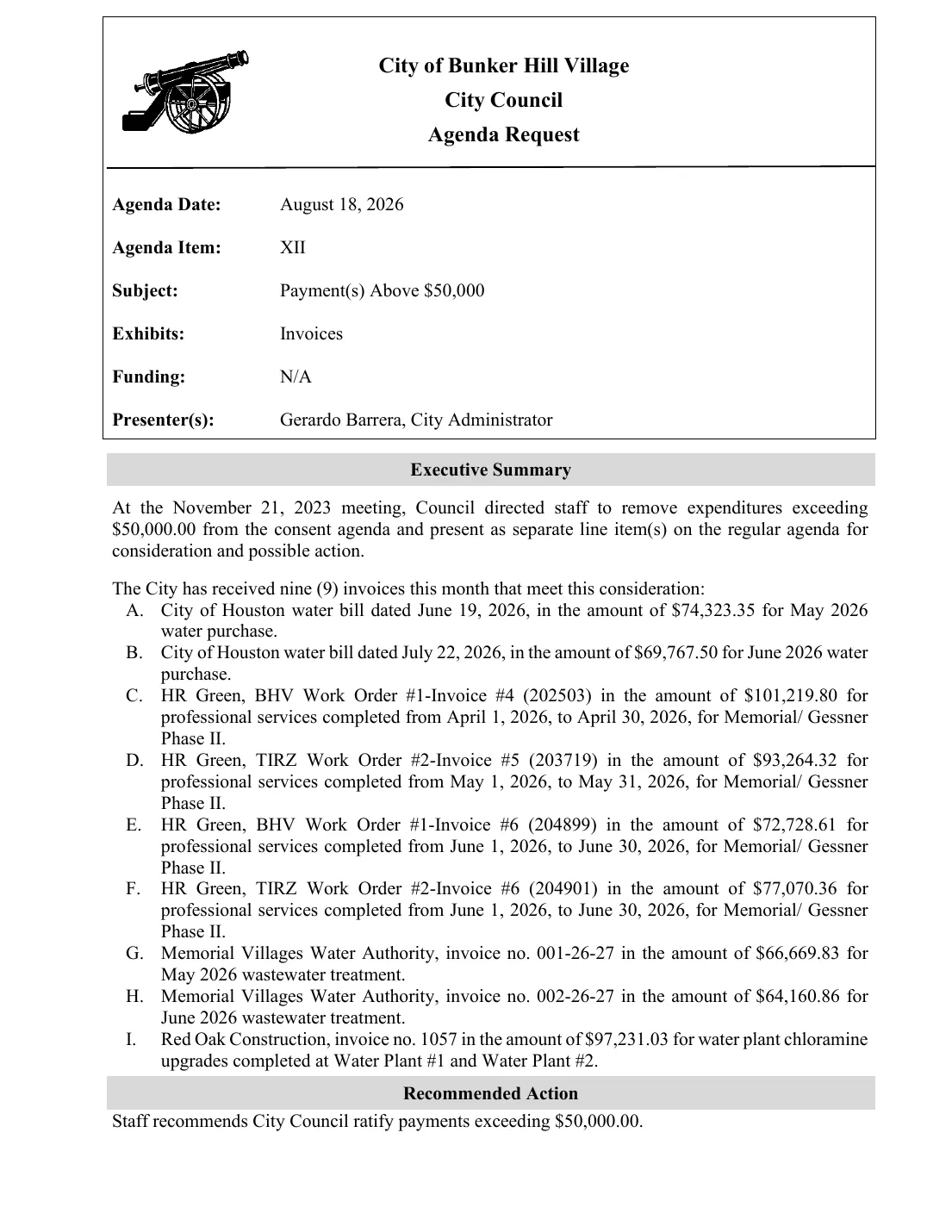
City of Bunker Hill Village · Agenda Request
Item XII · Payment(s) Above $50,000
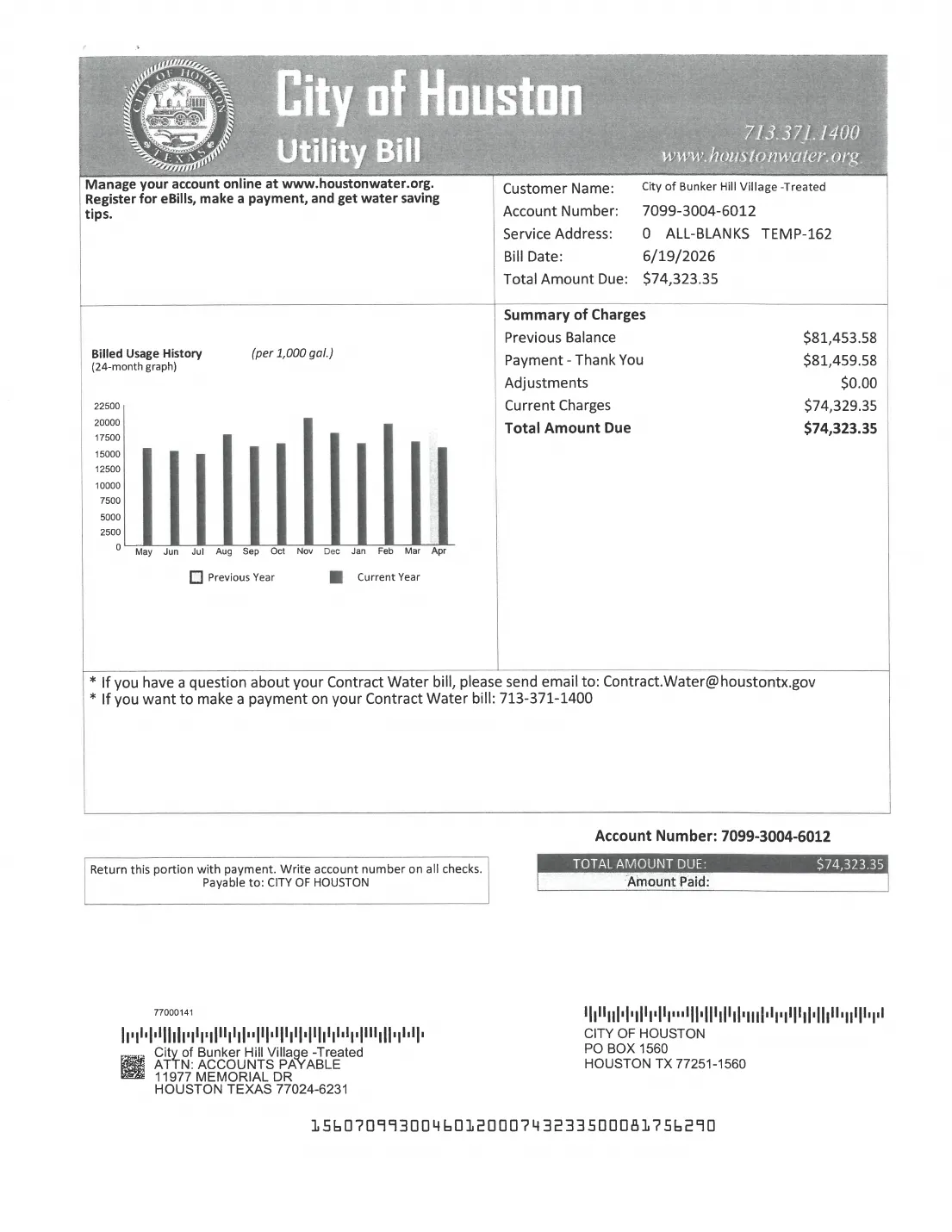
A. City of Houston water bill $74,323.35
B. City of Houston water bill $69,767.50
C. HR Green, BHV WO#1 Inv. #4 $101,219.80
D. HR Green, TIRZ WO#2 Inv. #5 $93,264.32
E. HR Green, BHV WO#1 Inv. #6 $72,728.61
F. HR Green, TIRZ WO#2 Inv. #6 $77,070.36
G. Memorial Villages Water Auth. $66,669.83
H. Memorial Villages Water Auth. $64,160.86
I. Red Oak Construction $97,231.03
- 50pagine scansionate lette
- 9fatture trovate e registrate
- $0.00differenza rispetto alla nota
- 1File Excel, modificato nuovamente per la richiesta 2
Apri i file originali
Questi sono i file effettivi dell'esecuzione. Scaricali e apribili in Excel.
Da dove proviene il file: City of Bunker Hill Village, Texas, Documentazione del Consiglio Comunale del 18 agosto 2026, punto XII dell'ordine del giorno, "Pagamenti superiori a 50.000 $". Un pubblico registro.
01 · IL FILE DI PARTENZA
Una nota dattiloscritta, poi 49 pagine di scansioni
La pagina 1 è una nota dattiloscritta che elenca nove fatture, da A a I, ciascuna superiore a 50.000 $. Le pagine da 2 a 50 sono scansioni: bollette dell'acqua, fatture di ingegneria con relative note di approvazione e supporto dei subappaltatori, bollette delle acque reflue con registri dei flussi e una fattura di costruzione.
Le pagine scansionate sono immagini prive di testo. le ha lette prima con il riconoscimento ottico dei caratteri (OCR), dopo aver chiesto in quale lingua fossero. Il PDF in sé non è stato modificato.
02 · RICHIESTA 1
Crea un registro AP, una riga per fattura
Cosa ha digitato il commercialista
This PDF is Item XII ('Payment(s) Above $50,000') from the Bunker Hill Village council packet for 18 August 2026. Page 1 is the typed cover memo listing nine invoices, A to I. Pages 2-50 are scans of those invoices plus backup (TGC approval memos, sub-consultant invoices, status reports, water flow records).

Please build an AP ledger in Excel with one row per memo item A-I. Do not add rows for the sub-consultant invoices (United Engineers, TEI, Cypress Environmental) - they are backup inside the HR Green packages. Columns:
1. Memo item (A-I)
2. Vendor
3. Invoice no. (for the City of Houston bills, use the account number)
4. Invoice / bill date
5. Service period or description
6. Amount due - read from the scanned invoice itself, not the memo
7. PDF page of the invoice's first page

Add a total row, and a reconciliation line showing the memo total, the ledger total and the difference.
Cosa ha fatto
- È stata trovata la prima pagina di ciascuna delle nove fatture nella scansione ed è stata annotata la pagina PDF corrispondente.
- Ogni importo è stato letto dalla fattura stessa, non dalla nota, come richiesto.
- Le fatture dei subappaltatori inserite nei pacchetti di ingegneria sono state escluse, come richiesto.
- È stato creato un nuovo file Excel con una riga per ogni voce della nota, da A a I.
- È stato aggiunto un totale sotto forma di formula e tre righe di controllo: totale della nota, totale del registro, differenza. Fai clic su una cella verde qui sotto per vederne una.
=SUM(F3:F11)| A | B | C | D | E | F | G | |
|---|---|---|---|---|---|---|---|
| 1 | Bunker Hill Village - Council 18 Aug 2026 - Item XII Payments Above $50,000 - AP Ledger (one row per memo item A-I) | ||||||
| 2 | Memo item | Vendor | Invoice no. (City of Houston = account no.) | Invoice / bill date | Service period or description | Amount due (USD, from scanned invoice) | PDF page (invoice first page) |
| 3 | A | City of Houston | 7099-3004-6012 | 06/19/2026 | May 2026 water purchase - treated water | 74323.35 | p.2 |
| 4 | B | City of Houston | 7099-3004-6012 | 07/22/2026 | June 2026 water purchase - treated water | 69767.5 | p.4 |
| 5 | C | HR Green, Inc. (BHV Work Order #1) | 202503 | 05/19/2026 | Professional services 04/01/2026-04/30/2026, Memorial/Gessner Phase II (Proj 2502530.01/.02) | 101219.8 | p.7 |
| 6 | D | HR Green, Inc. (TIRZ Work Order #2) | 203719 | 06/18/2026 | Professional services 05/01/2026-05/31/2026, Memorial/Gessner Phase II (Proj 2502530.03/.04) | 93264.32 | p.25 |
| 7 | E | HR Green, Inc. (BHV Work Order #1) | 204899 | 07/15/2026 | Professional services 06/01/2026-06/30/2026, Memorial/Gessner Phase II (Proj 2502530.01/.02) | 72728.61 | p.33 |
| 8 | F | HR Green, Inc. (TIRZ Work Order #2) | 204901 | 07/15/2026 | Professional services 06/01/2026-06/30/2026, Memorial/Gessner Phase II (Proj 2502530.03/.04) | 77070.36 | p.41 |
| 9 | G | Memorial Villages Water Authority | 001-26-27 | 06/01/2026 (due 07/10/2026) | May 2026 wastewater treatment | 66669.83 | p.46 |
| 10 | H | Memorial Villages Water Authority | 002-26-27 | 07/01/2026 (due 08/10/2026) | June 2026 wastewater treatment | 64160.86 | p.48 |
| 11 | I | Red Oak Construction LLC | 1057 | 04/30/2026 (due 06/03/2026) | BHV Water Plant #1-2 Chloramine Upgrades | 97231.03 | p.50 |
| 12 | TOTAL (ledger) | 716435.66 | |||||
| 13 | |||||||
| 14 | Memo total (sum of memo items A-I) | 716435.66 | |||||
| 15 | Ledger total (SUM formula cell reference) | 716435.66 | |||||
| 16 | Difference (Ledger - Memo) | 0 | |||||
Lo abbiamo confrontato con le scansioni: tutti e nove gli importi, i numeri di fattura e i numeri di pagina sono corretti e il totale del registro di 716.435,66 $ corrisponde al totale della nota.
03 · RICHIESTA 2
Ora aggiungi le categorie Co.Ge. e un riepilogo
Cosa ha digitato il commercialista
In the same workbook, extend the ledger:
1. Add a 'GL category' column using these categories: Water purchase; Wastewater treatment; Engineering - Memorial/Gessner Ph II - BHV Work Order #1; Engineering - Memorial/Gessner Ph II - TIRZ Work Order #2; Capital - water plant.
2. Add a 'Handwritten notes' column: transcribe any handwriting on that item's pages (e.g. marks on the TGC approval memo or the invoice itself). Write 'none' if there is no handwriting, and 'illegible' if you can't read it - please don't guess. Typed 'Approved by' stamps don't count.
3. Add a 'Summary' sheet with SUMIF totals by GL category, and a check that the category totals add back to the ledger total.

Don't change the turn-1 rows or amounts.
Cosa ha fatto
- Ha aperto il registro appena creato e ha modificato lo stesso file Excel.
- È stata aggiunta una colonna "Categoria Co.Ge.", utilizzando solo le cinque categorie fornite dal commercialista.
- È stato aggiunto un nuovo foglio "Riepilogo": una formula SOMMA.SE per categoria, un totale e un controllo che restituisce 0.
- Nessuna riga o importo della richiesta 1 è stato modificato. Abbiamo controllato ogni cella.
Water purchase| A | B | C | D | E | F | G | H | |
|---|---|---|---|---|---|---|---|---|
| 1 | Bunker Hill Village - Council 18 Aug 2026 - Item XII Payments Above $50,000 - AP Ledger (one row per memo item A-I) | |||||||
| 2 | Memo item | Vendor | Invoice no. (City of Houston = account no.) | Invoice / bill date | Service period or description | Amount due (USD, from scanned invoice) | PDF page (invoice first page) | GL category |
| 3 | A | City of Houston | 7099-3004-6012 | 06/19/2026 | May 2026 water purchase - treated water | 74323.35 | p.2 | Water purchase |
| 4 | B | City of Houston | 7099-3004-6012 | 07/22/2026 | June 2026 water purchase - treated water | 69767.5 | p.4 | Water purchase |
| 5 | C | HR Green, Inc. (BHV Work Order #1) | 202503 | 05/19/2026 | Professional services 04/01/2026-04/30/2026, Memorial/Gessner Phase II (Proj 2502530.01/.02) | 101219.8 | p.7 | Engineering - Memorial/Gessner Ph II - BHV Work Order #1 |
| 6 | D | HR Green, Inc. (TIRZ Work Order #2) | 203719 | 06/18/2026 | Professional services 05/01/2026-05/31/2026, Memorial/Gessner Phase II (Proj 2502530.03/.04) | 93264.32 | p.25 | Engineering - Memorial/Gessner Ph II - TIRZ Work Order #2 |
| 7 | E | HR Green, Inc. (BHV Work Order #1) | 204899 | 07/15/2026 | Professional services 06/01/2026-06/30/2026, Memorial/Gessner Phase II (Proj 2502530.01/.02) | 72728.61 | p.33 | Engineering - Memorial/Gessner Ph II - BHV Work Order #1 |
| 8 | F | HR Green, Inc. (TIRZ Work Order #2) | 204901 | 07/15/2026 | Professional services 06/01/2026-06/30/2026, Memorial/Gessner Phase II (Proj 2502530.03/.04) | 77070.36 | p.41 | Engineering - Memorial/Gessner Ph II - TIRZ Work Order #2 |
| 9 | G | Memorial Villages Water Authority | 001-26-27 | 06/01/2026 (due 07/10/2026) | May 2026 wastewater treatment | 66669.83 | p.46 | Wastewater treatment |
| 10 | H | Memorial Villages Water Authority | 002-26-27 | 07/01/2026 (due 08/10/2026) | June 2026 wastewater treatment | 64160.86 | p.48 | Wastewater treatment |
| 11 | I | Red Oak Construction LLC | 1057 | 04/30/2026 (due 06/03/2026) | BHV Water Plant #1-2 Chloramine Upgrades | 97231.03 | p.50 | Capital - water plant |
| 12 | TOTAL (ledger) | 716435.66 | ||||||
| 13 | ||||||||
| 14 | Memo total (sum of memo items A-I) | 716435.66 | ||||||
| 15 | Ledger total (SUM formula cell reference) | 716435.66 | ||||||
| 16 | Difference (Ledger - Memo) | 0 | ||||||
=SUMIF('AP Ledger - Item XII'!H3:H11,A3,'AP Ledger - Item XII'!F3:F11)| A | B | |
|---|---|---|
| 1 | Summary by GL category (SUMIF from AP Ledger - Item XII) | |
| 2 | GL category | Total (USD) |
| 3 | Water purchase | 144090.85 |
| 4 | Wastewater treatment | 130830.69 |
| 5 | Engineering - Memorial/Gessner Ph II - BHV Work Order #1 | 173948.41 |
| 6 | Engineering - Memorial/Gessner Ph II - TIRZ Work Order #2 | 170334.68 |
| 7 | Capital - water plant | 97231.03 |
| 8 | Total of categories | 716435.66 |
| 9 | Ledger total (AP Ledger - Item XII!F12) | 716435.66 |
| 10 | Check (categories - ledger; must be 0) | 0 |
Da una pila di scansioni a numeri verificabili
La maggior parte degli strumenti di IA riassume una scansione in una risposta in chat. legge ogni pagina, inserisce i dati in un vero foglio di calcolo con formule, indica da quale pagina proviene ciascuno e continua a lavorare nello stesso file quando chiedi di più.
CONTINUA A LEGGERE
Leggi un altro esempio pratico
Commercialisti e revisori
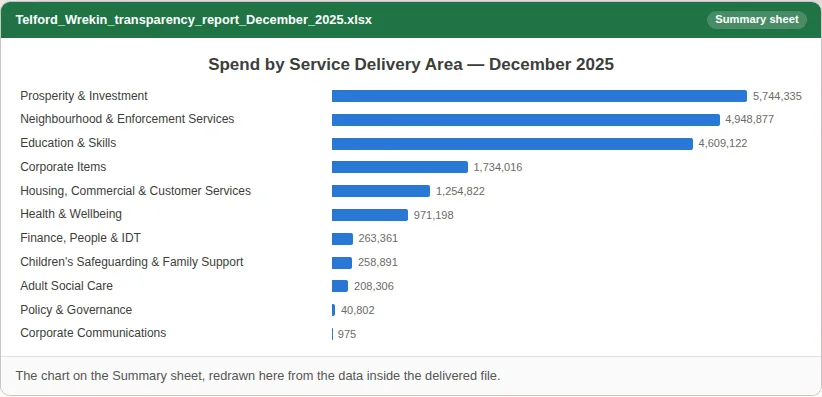
Pulire i dati di spesa di un consiglio, riepilogarli e verificare la presenza di duplicati
Bancari e consulenti
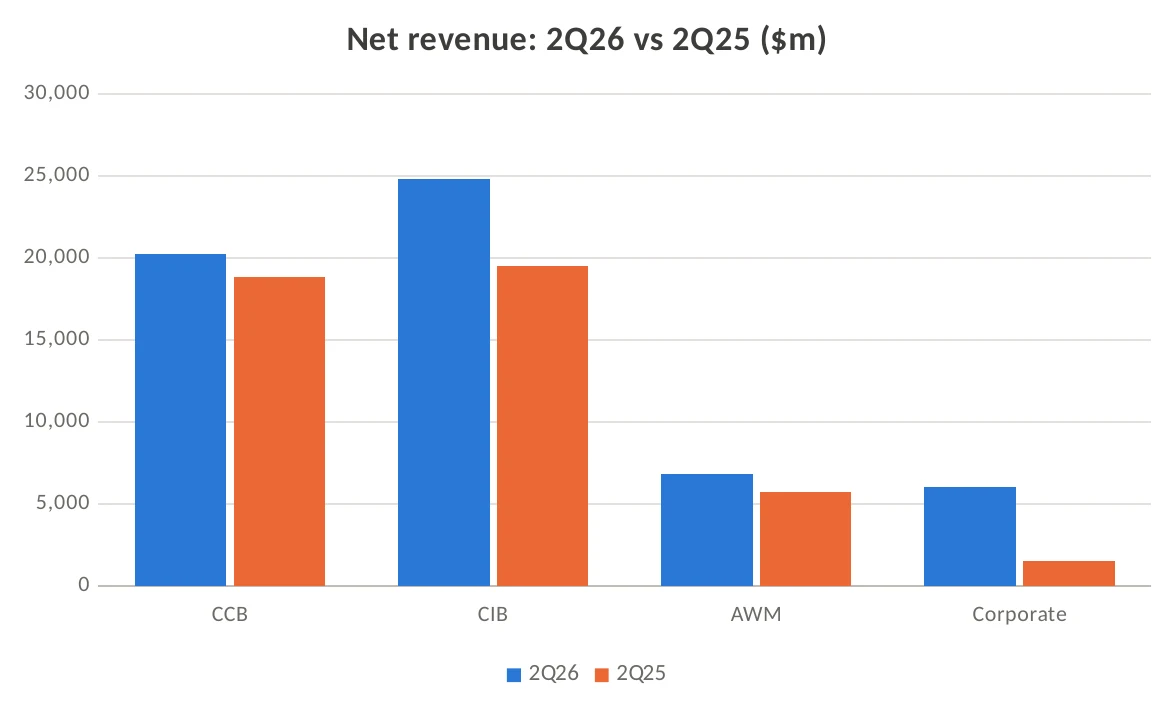
PDF di comunicati finanziari in Excel, con formule YoY e grafico
Marketing e comunicazione
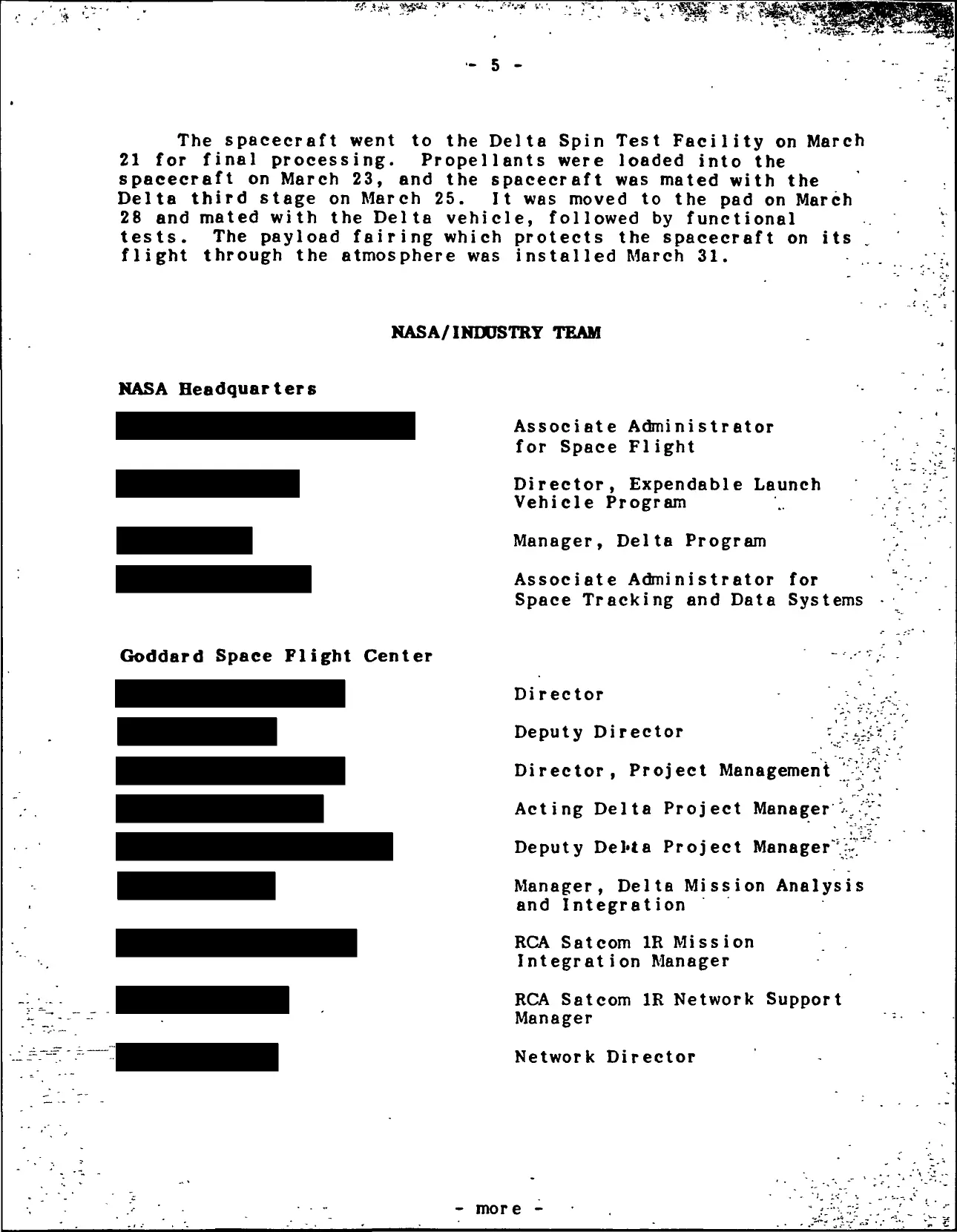
Cartella stampa della NASA del 1983 scansionata e censurata, poi parzialmente svelata
Vedi tutti i 19 esempi pratici →Tutti gli esempi per Commercialisti e revisori →