WORKED EXAMPLE · PDF TO EXCEL
Earnings release PDF to Excel, with YoY formulas and a chart
A bank analyst received JPMorganChase’s second-quarter 2026 earnings release, an 8-page PDF. They asked to put the results tables for the Firm and its segments into Excel, with their own year-on-year formulas and a chart for the desk note.
read the tables on pages 2 to 5 and built a “Results” sheet: one block per table, every figure stored as a number, a YoY % formula on every row, and a clustered column chart of segment net revenue linked to the table.
1The upload: an 8-page earnings release, as a PDF
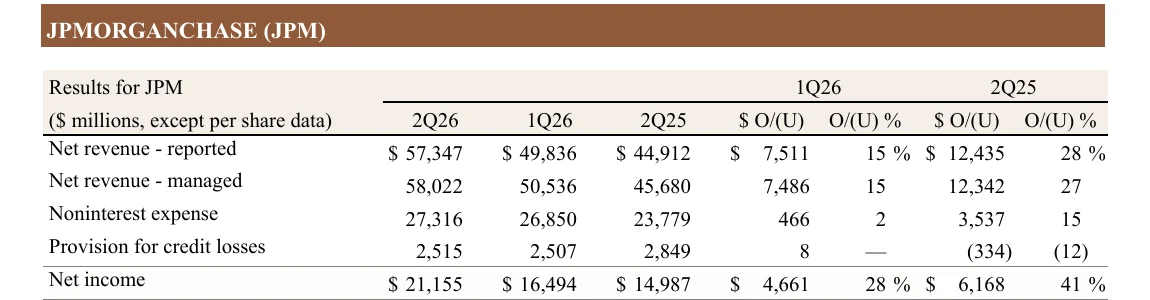
JPMORGANCHASE (JPM)
($ millions)2Q261Q262Q25O/(U) %
Net revenue - reported$ 57,347$ 49,836$ 44,91228 %
Net revenue - managed58,02250,53645,68027
Noninterest expense27,31626,85023,77915
Provision for credit losses2,5152,5072,849(12)
Net income$ 21,155$ 16,494$ 14,98741 %
Net revenue: 2Q26 vs 2Q25 ($m)
CCBCIBAWMCorporate
2Q26 2Q25
- 5results tables read from the PDF
- 63figures, all stored as numbers
- 21YoY % formulas
- 1chart linked to the table
Open the real files
The release is linked at its official home. The workbook is the one from the run. Download it and open it in Excel.
Where the file comes from: JPMorganChase Investor Relations, quarterly earnings, second quarter 2026 earnings release. A public investor communication; © JPMorgan Chase & Co.
01 · THE STARTING FILE
An 8-page press release with a results table per business
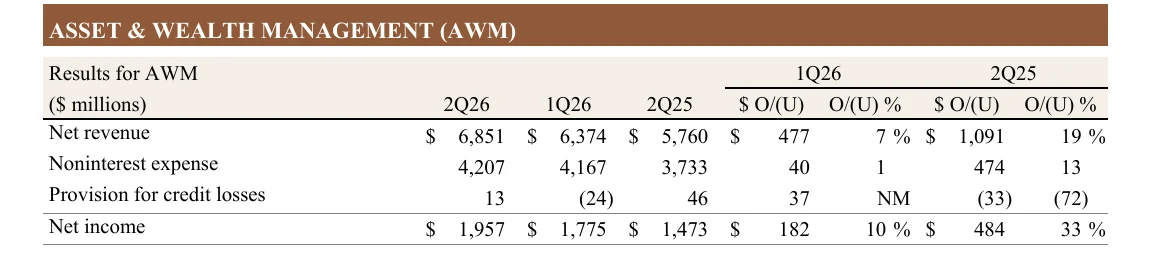
Page 2 has the results for the whole Firm. Pages 3 to 5 have one table per business: Consumer & Community Banking, Commercial & Investment Bank, Asset & Wealth Management, and Corporate. Each table shows three quarters, then the change against each earlier quarter in dollars and per cent.
The release is a typed PDF, so the text is already in it and no OCR was needed. read the tables straight from pages 2 to 5. The PDF itself was not changed.
02 · THE REQUEST
"Build me a results workbook with YoY formulas and a chart"
What the analyst typed
Attached is JPMorganChase's 2Q26 earnings release. Please build me an Excel workbook from the results tables on pages 2-5:
1. One sheet called "Results" with a block for each table: Firm (page 2), CCB (page 3), CIB (page 4), AWM (page 4) and Corporate (page 5).
2. In each block keep the rows Net revenue, Noninterest expense, Provision for credit losses and Net income. For the Firm keep both 'Net revenue - reported' and 'Net revenue - managed'.
3. Columns 2Q26, 1Q26 and 2Q25 in $ millions. Leave out the release's own O/(U) columns.
4. Bracketed figures like (24) are negatives and must be stored as numbers, not text.
5. Add my own YoY % column (2Q26 vs 2Q25) as an Excel formula, so I can tie it to the release.
6. Add a clustered bar chart of 2Q26 vs 2Q25 net revenue for CCB, CIB, AWM and Corporate.
What did
- Read the five results tables on pages 2 to 5 of the PDF.
- Made a new Excel file with one sheet, "Results", and one block per table: Firm, CCB, CIB, AWM and Corporate.
- Kept only the rows asked for, with both reported and managed net revenue for the Firm, and the three quarters in $ millions. The release’s own change columns were left out.
- Stored bracketed figures as negative numbers: (24) became -24, and (10) and (1) became -10 and -1.
- Added a YoY % column that is a formula on every row, such as =(B8/D8)-1. Click a green cell below to see one.
- Drew a real Excel clustered column chart of 2Q26 against 2Q25 net revenue for the four segments. Its data block points back to the tables with formulas, so the chart follows the numbers.
=(B8/D8)-1| A | B | C | D | E | |
|---|---|---|---|---|---|
| 1 | JPMorgan Chase 2Q26 Results ($ in millions) | ||||
| 2 | FIRM | ||||
| 3 | 2Q26 | 1Q26 | 2Q25 | YoY % | |
| 4 | Net revenue - reported | 57,347 | 49,836 | 44,912 | 27.7% |
| 5 | Net revenue - managed | 58,022 | 50,536 | 45,680 | 27.0% |
| 6 | Noninterest expense | 27,316 | 26,850 | 23,779 | 14.9% |
| 7 | Provision for credit losses | 2,515 | 2,507 | 2,849 | -11.7% |
| 8 | Net income | 21,155 | 16,494 | 14,987 | 41.2% |
| 9 | CCB — Consumer & Community Banking | ||||
| 10 | 2Q26 | 1Q26 | 2Q25 | YoY % | |
| 11 | Net revenue | 20,272 | 19,568 | 18,847 | 7.6% |
| 12 | Noninterest expense | 11,108 | 10,979 | 9,858 | 12.7% |
| 13 | Provision for credit losses | 2,156 | 2,050 | 2,082 | 3.6% |
| 14 | Net income | 5,311 | 4,976 | 5,169 | 2.7% |
| 15 | CIB — Commercial & Investment Bank | ||||
| 16 | 2Q26 | 1Q26 | 2Q25 | YoY % | |
| 17 | Net revenue | 24,853 | 23,379 | 19,535 | 27.2% |
| 18 | Noninterest expense | 11,390 | 11,136 | 9,641 | 18.1% |
| 19 | Provision for credit losses | 356 | 482 | 696 | -48.9% |
| 20 | Net income | 9,678 | 9,044 | 6,650 | 45.5% |
| 21 | AWM — Asset & Wealth Management | ||||
| 22 | 2Q26 | 1Q26 | 2Q25 | YoY % | |
| 23 | Net revenue | 6,851 | 6,374 | 5,760 | 18.9% |
| 24 | Noninterest expense | 4,207 | 4,167 | 3,733 | 12.7% |
| 25 | Provision for credit losses | 13 | -24 | 46 | -71.7% |
| 26 | Net income | 1,957 | 1,775 | 1,473 | 32.9% |
| 27 | CORPORATE | ||||
| 28 | 2Q26 | 1Q26 | 2Q25 | YoY % | |
| 29 | Net revenue | 6,046 | 1,215 | 1,538 | 293.1% |
| 30 | Noninterest expense | 611 | 568 | 547 | 11.7% |
| 31 | Provision for credit losses | -10 | -1 | 25 | -140.0% |
| 32 | Net income | 4,209 | 699 | 1,695 | 148.3% |
| 33 | |||||
| 34 | Segment | 2Q26 | 2Q25 | ||
| 35 | CCB | 20,272 | 18,847 | ||
| 36 | CIB | 24,853 | 19,535 | ||
| 37 | AWM | 6,851 | 5,760 | ||
| 38 | Corporate | 6,046 | 1,538 | ||
Net revenue: 2Q26 vs 2Q25 ($m)
- 2Q26
- 2Q25
We checked it against the release: all 63 figures match pages 2 to 5, and the four segments’ 2Q26 net revenue adds up to the Firm’s managed net revenue of $58,022 million.
From a PDF table to a workbook you can build on
Copying tables out of a PDF usually means retyping numbers and fixing brackets by hand. reads the tables, stores every figure as a real number, and adds the formulas and the chart you ask for.
KEEP READING
Read another worked example
Bankers & Consultants
Turn a World Bank outlook chapter into a client steering deck
Bankers & Consultants
State RFP to a compliance matrix, then a response outline
Bankers & Consultants
A Chinese half-year report summary translated into English
See all 19 worked examples →All examples for Bankers & Consultants →